15.2. Email Templates
- An email template is a basic HTML document, which defines how the mail must be rendered to the recipient.
- The email template saves same template format, which is used every time the mail is sent to the recipient.
- The purpose of the template is to make the users get used to receiving mail on a daily, weekly or monthly basis.
To access email templates:
Click
System > Email Templates. The following Manage Email Templates appears displaying various email formats.

Different types of email templates are as follows:
| ID | Actions |
|---|---|
| User Registration | New user account creation mail sent to the user. |
| Forgot Password | Mail sent by user to reset forgotten password. |
| Reset Password | Password reset mail sent to user by admin. |
| Training Cancelled | Mail sent to users regarding cancellation of the training program due to a specific reason |
| Training Published | Mail sent to user regarding new training plan added to the user’s training program. |
| Training Request Approved | Mail sent to users regarding training program approved by his/her reporting manager. |
| Training Request Rejected | Mail sent to users regarding the training program rejected by his/her reporting manager. |
| Training Cancel Request Approved | Mail sent to user regarding approval of training cancellation. |
| Training Cancel Request Rejected | Mail sent to user regarding rejection of training cancellation. |
| Need Based Training Approval | Mail sent to user for Need Based Training approval. |
| Need Based Training Request | Mail sent to admin or reporting manager for the Need Based Training request. |
| Assessment Test Request | Mail sent to admin regarding test re-attempts. |
| Approved Request For Private Resource | Mail sent to users regarding approval of request for the resources. |
| Rejected Request For Private Resource | Mail sent to users regarding rejection of request for the resources. |
| Approved Requested Renewal of Program | Mail sent to users regarding approval of program renewal. |
| Rejected Requested Renewal of Program | Mail sent to users regarding rejection of program renewal. |
| Pre-work Resource Approval | Mail sent to users regarding approval of pre-work resources. |
| Pre-work Resource Request | Mail sent to reporting manager for pre-work resource request. |
| Request Approved | Mail sent to users regarding approval of the test re-attempt. |
| Request Rejected | Mail sent to users regarding the rejection of the test re-attempt. |
| ILT Training Cancel Request | Mail sent to users regarding request approval for training cancellation. |
| ILT Training Canceled | Mail sent to users regarding cancellation of training cancellation request. |
| ILT Cancel Request To Manager | Mail sent to reporting manager regarding request for training cancellation. |
| ILT Request To Manager | Mail sent to reporting manager regarding request for attending the training. |
| ILT Training Request | Mail sent to reporting manager requesting classroom training. |
| ILT Training Confirmed | Mail sent to users regarding confirmation of the nomination for the training program. |
| Action Plan Manager Review | Mail sent to reporting manager regarding the action plan reviewed by the user. |
| Action Plan Review | Mail sent to reporting manager regarding new action plan filled by user. |
| Library Approval | Mail sent to users regarding approval for uploading library resources. |
| ILT Waiting List | Mail sent to users regarding training nomination is in waiting list. |
| ILT Waiting List Confirmed | Mail sent to users regarding training nomination waiting list confirmation. |
| Notification | Mail regarding new announcements |
| Renew Program Request | Mail sent to reporting manager regarding request approval for renewal of the training program. |
| Report Mail | Mail regarding weekly report. |
| Request For Library Approval | Mail sent to reporting manager regarding request approval for uploading library resources. |
| Request For Private Resource | Mail sent to reporting manager regarding request approval for enrolling the course. |
| Resource Certificate Email | Mail regarding the certificate |
| Live Session Invite | Mail sent to users regarding live session schedule |
| Live Session Update | Mail sent to users regarding change of live session schedule. |
| ILT Pre Work Reminder | Reminder mail to upload pre-work resource for training program. |
| ILT AP Setting to Review Cycle Reminder | Reminder mail to review the progress made by the user on the action plan of the training program. |
| ILT AP Setting To Update Reminder | Reminder mail to fill the action plan details of the training program. |
| ILT Confirmation Date Reminder | Remainder mail to reporting manager to confirm training dates from his/her team. |
| ILT fill Feedback Reminder | Remainder mail to the user to fill the feedback form details. |
| ILT Supervisor Request Not Approved Reminder | Reminder mail to user regarding reporting manager not reviewed the training program. |
| ILT Non Updated Users Reminder | Remainder mail to users who have not updated their action plan. |
| ILT Post Fill Feedback Reminder | Final remainder mail to users to fill the feedback form details. |
| ILT Max Seats Reminder | Remainder mail regarding maximum seats not filled for the instance. |
| ILT Program Invitation Reminder | Remainder mail to user for attending the training program. |
| ILT WL Nomination Reminder | Reminder mail regarding a training program is scheduled in queue. |
| ILT Trainer Removed | Mail to the trainer regarding removal as a trainer for the training program at a given session. |
| ILT Designated As Trainer | Mail to trainer regarding designation as trainer for given training program. |
| ILT Rescheduled For User | Mail to user regarding classroom training rescheduled. |
| ILT Rescheduled For Trainer | Mail to trainer regarding classroom training session rescheduled. |
| Poll Publish | Mail is sent to users of selected user groups. |
| Resource Publish | Mail is sent to selected user groups to whom resources are published. |
| Survey Notification | Mail is sent to users of selected user groups. |
15.2.1. SMS Template
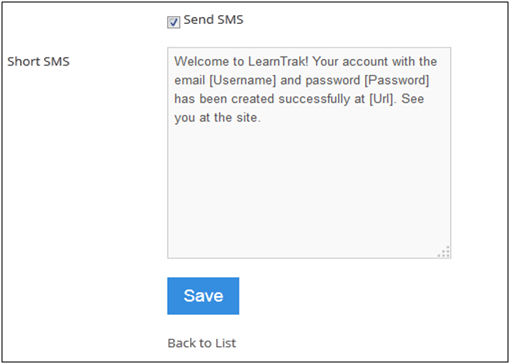
- An SMS event notification can also be sent to the users by checking the Send SMS option.
- The default SMS message templates are integrated with the SMS gateway settings and based on the settings the messages are sent & received by the users.
To access SMS template:
Click Edit
. The Edit Email Template screen appears with the selected fields to be edited.