7.2.3. Training Aids
- The administrator can manage the training aids under the this module.
- The training aids created are mapped to the training rooms of the classroom training.
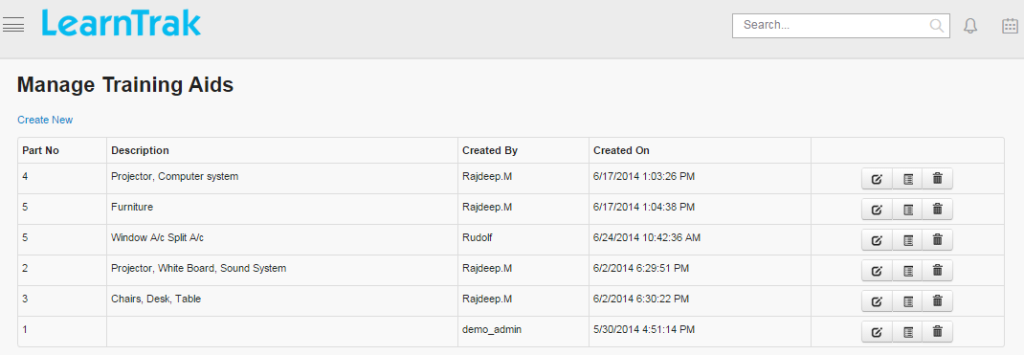
- Multiple training aids can be created, edited, deleted and the details of training aids can be viewed such as Part No, Description, Created By and On for the particular training.
Example: White Board, Markers, Projectors, Operating Systems, Tables and Chairs etc.
To access training aids:
Click
Admin > Classroom > Training Aids. The following Manage Training Aids screen appears that displays training aid details.
7.2.3.1. Create New Training Aids
To create training aids:
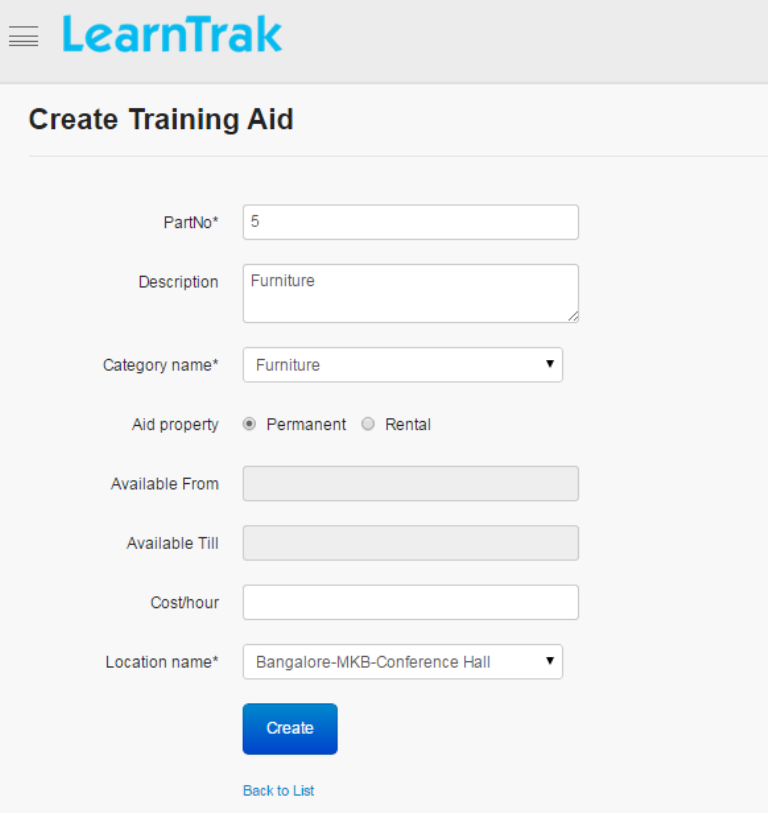
Click Create New. The following Create Training Aids screen appears with the required fields to be filled.
Note
- Category Name is mapped to the aid categories, that is selected from the dropdown list
- The Aid Property can be chosen either as permanent or rental.
o If it is rental, then Available From Date and Till Date is required.o If it is permanent, then Available From Date and Till Date not required.
- Location Name must be selected from dropdown list.
7.2.3.2. Edit, Delete and View Details of Training Aids
To edit training aids:
Click Edit. The Edit Training Aids screen appears with the chosen fields to be edited.
To delete training aids:
Click Delete. An alert box is displayed with the following message: “Do you want to delete the Training Aid Name?”, click Ok or Cancel.
Note
Training aids cannot be deleted, if is assigned with dependency. For example, if the training aid is mapped to the training rooms, then it cannot be deleted.
To view training aids detail:
Click Details. The Details screen appears displaying details of the training aids created. The administrator can also edit details, by clicking Edit which is redirected to the Edit Training Aids screen.