7.2.11. Training Holidays
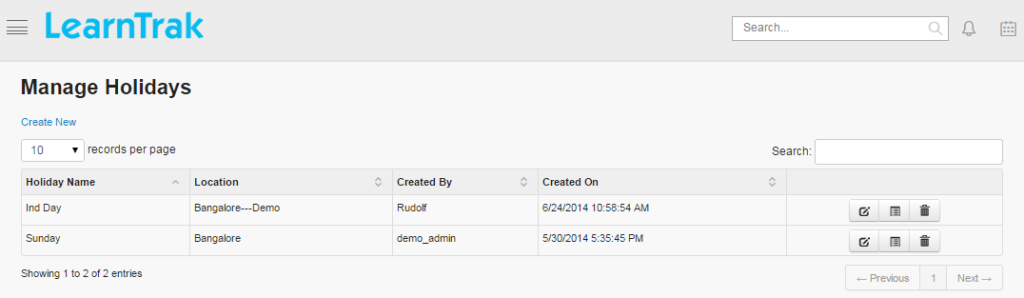
The training holidays can be created, edited, deleted and the details of the training holidays can be viewed such as Holiday Name, Locations, Created By and On of the respective classroom trainings.
To access training holidays:
Click
Admin > Classroom > Training Holidays. The following Manage Holidays screen appears displaying training holiday details.
7.2.11.1. Create Training Holidays
To create training holidays:
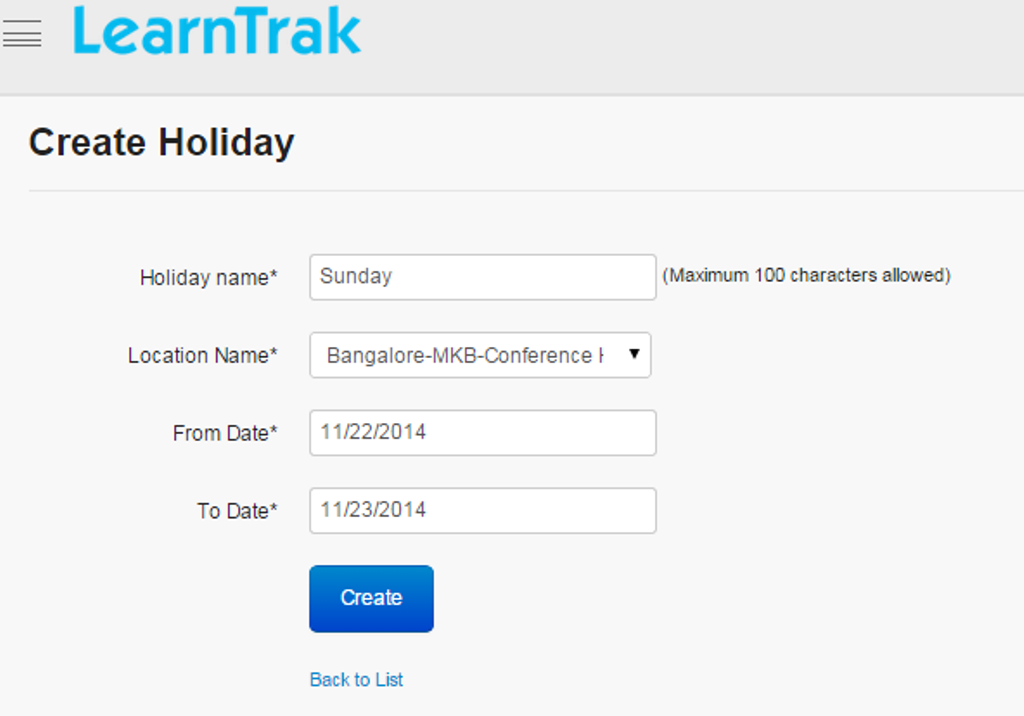
Click Create New. The following Create Holiday screen appears with the required fields to be filled.
7.2.11.2. Edit, Delete and View Training Holiday Details
To edit training holidays:
Click Edit. The Edit Holiday screen appears with the chosen fields to be edited.
To delete training holidays:
Click Delete. A message box prompts the message: “Do you want to delete the holiday Holiday_Name?”, click Ok or Cancel.
To view training holiday details:
Click Details. The Details screen appears displaying details of the training holidays created. The administrator can also edit details, by clicking Edit which will be redirected to the Edit Holiday screen.