7.2.10. Training Rooms
- The administrator manages the repository of the training rooms under this module.
- The training rooms are mapped to the layouts, locations and training aids of the classroom training.
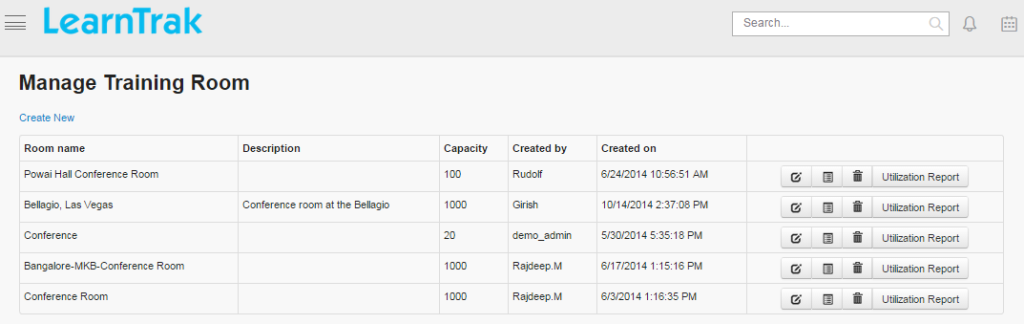
- Training rooms can be created, edited, deleted and the details on training rooms can be viewed such as Room Name, Description, Capacity, Created By and On of the particular trainings.
Example: Conference Room, Lab Room, Induction Room etc.
To access training rooms:
Click
Admin > Classroom > Training Room. The following Manage Training Room screen appears that displays training room details.
7.2.10.1. Create New Training Rooms
To create training rooms:
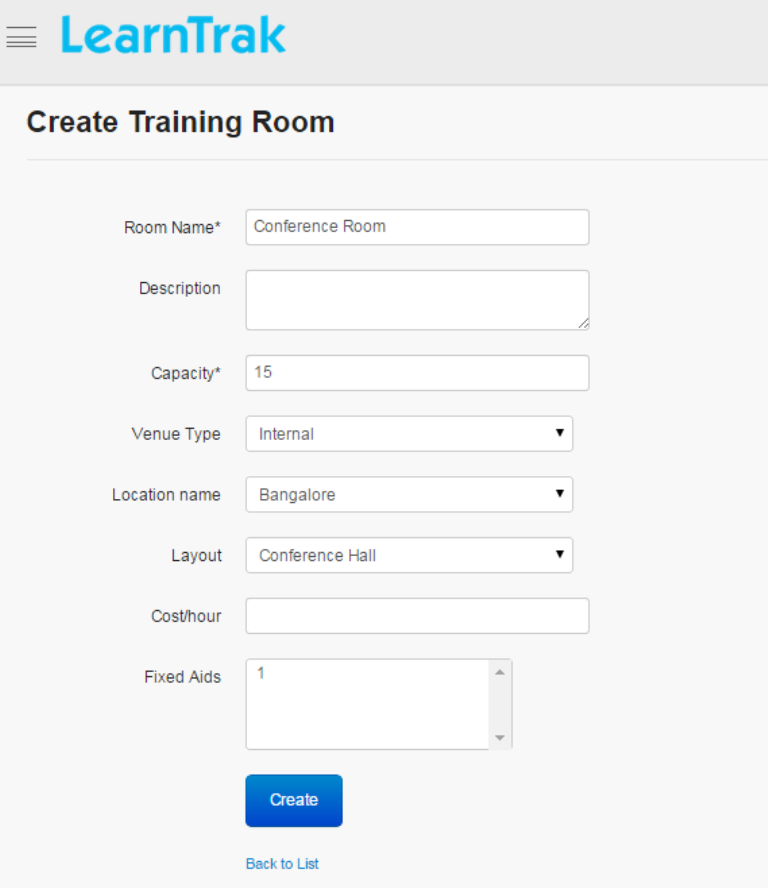
Click Create New. The following Create Training Room screen appears with the required fields to be filled.
Note
- The Venue Type is of 2 types and is selected from the drop down list:
- o Internalo External
The Location Name is selected from the drop down list and is mapped to the locations of the classroom trainings.
The Layout is selected from the drop down list and is mapped to the layouts of the classroom trainings.
The Fixed Aids are mapped to the training aids based on the selected location.
7.2.10.2. Edit, Delete and View Details of Training Room
To edit training room:
Click Edit. The Edit Training Room screen appears with the chosen fields to be edited.
To delete training room:
Click Delete. An alert box is displayed with the following message: “Do you want to delete the Training Room?”, click Ok or Cancel.
Note
Training Room cannot be deleted, if is assigned with dependency. For example, if the training room is mapped to the layouts, then it cannot be deleted.
To view training room details:
Click Details. The Details screen appears displaying details of the training rooms created. The administrator can also edit details, by clicking Edit which is redirected to the Edit Training Room screen.
7.2.10.3. Utilization Reports
- The utilization report generates the training room usage report based on the number of hours used per day and by applying start date & time - end date & time as the filter.
- The total usage percentage is calculated based on the total hours used + cost/hour.